What is DocScorm? The Definitive Guide to "PDF to SCORM" & "SCORM to Doc" for Modern LMSs
Everything you need to know about DocScorm, how "PDF to SCORM" converts static workplace documents into trackable e-learning modules, and how "SCORM to Doc" decompiles legacy packages for two-way round-trip editing.
- 01.1. The Core Problem: Why Uploading a Raw PDF to an LMS Fails
- 02.2. What is SCORM? (Sharable Content Object Reference Model)
- 03.3. What Does "PDF to SCORM" (or Doc to SCORM) Actually Mean?
- 04.4. What Does "SCORM to Doc" Mean? (The Reverse-Engineering Safety Net)
- 05.5. Who Uses DocScorm? (Ideal Customer Profiles & Global Use Cases)
- 06.6. Global Localization: 60+ Languages & Full RTL Support
- 07.7. Technical Comparison: Raw PDF vs Articulate 360 vs DocScorm
- 08.Frequently Asked Questions
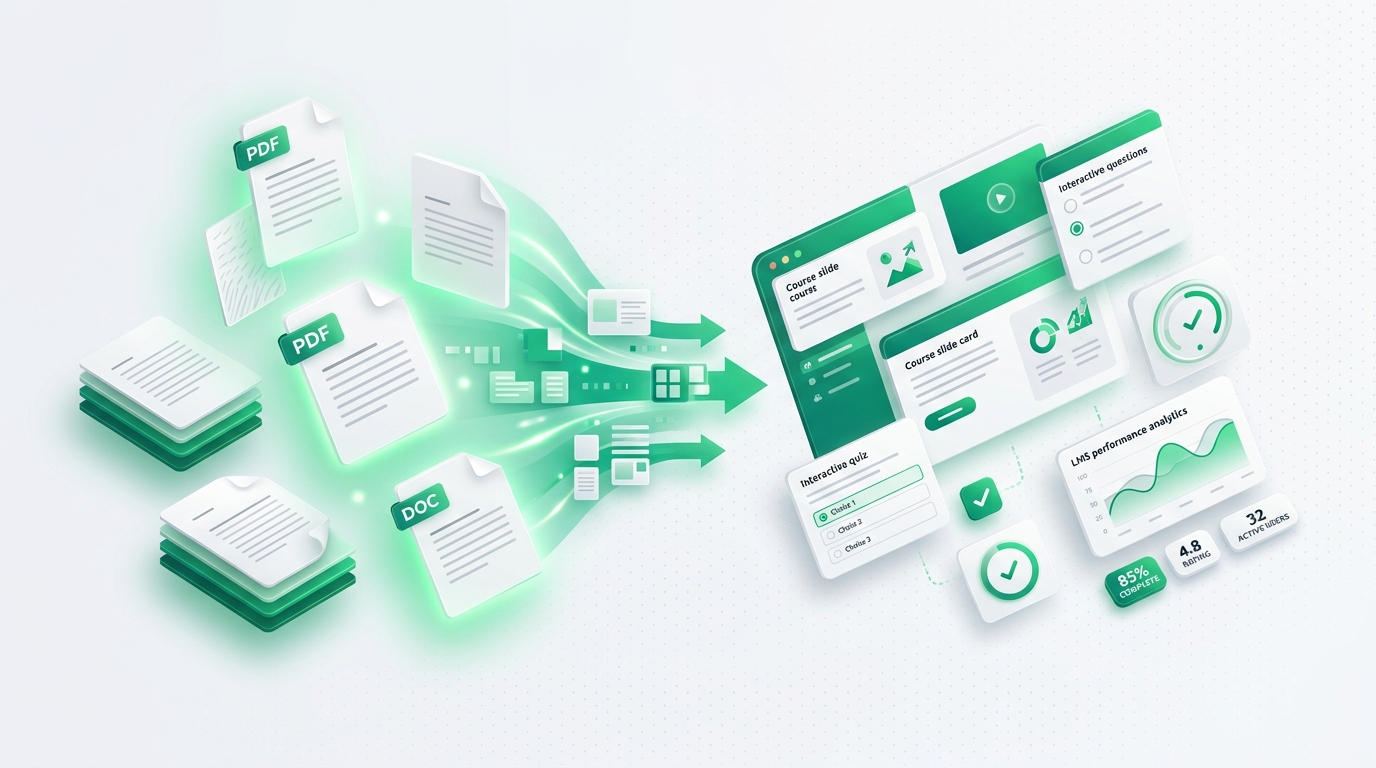
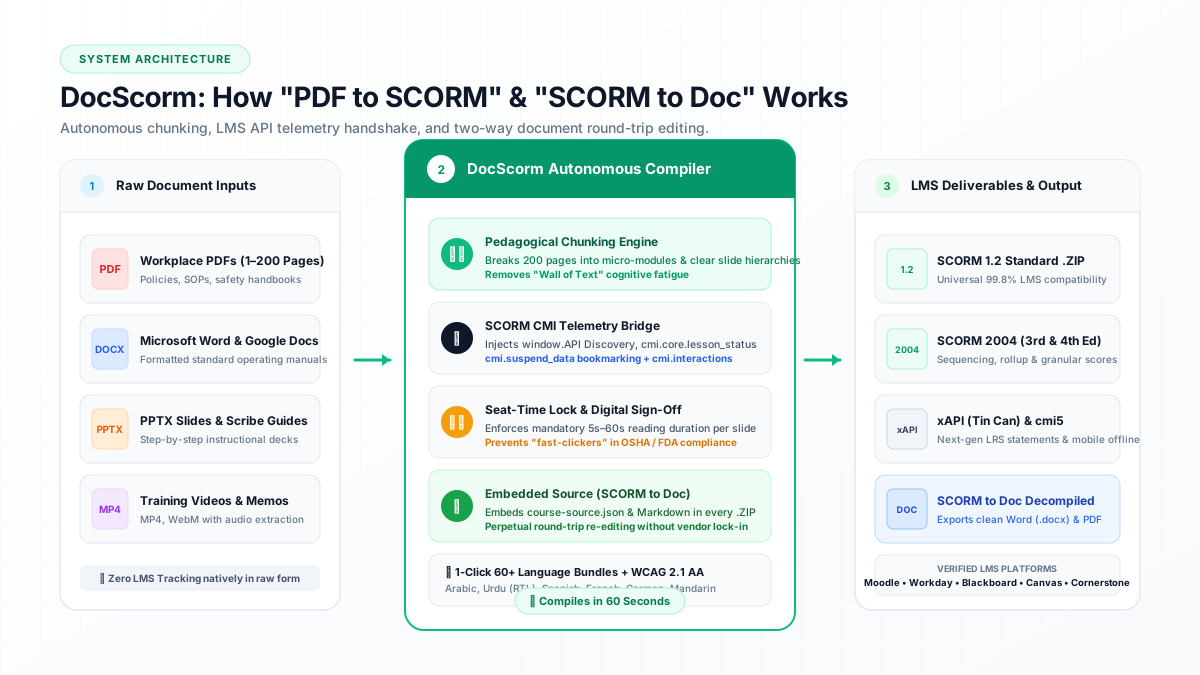
Direct Answer: DocScorm is an autonomous instructional compiler that ingests PDFs (up to 200 pages), Word SOPs, PPTX decks, and MP4 videos, automatically chunking them into interactive, mobile-responsive SCORM 1.2, SCORM 2004, xAPI, and cmi5 courses.
- DocScorm is an autonomous instructional compiler that ingests PDFs (up to 200 pages), Word SOPs, PPTX decks, and MP4 videos, automatically chunking them into interactive, mobile-responsive SCORM 1.2, SCORM 2004, xAPI, and cmi5 courses.
- "PDF to SCORM" solves the "LMS Blindspot": standard LMSs (Canvas, Moodle, Blackboard, Workday) cannot track if a student actually read a static PDF. SCORM wrapping injects API handshakes (LMSInitialize, LMSSetValue, LMSCommit) to record seat-time, slide progression, and quiz scores.
- "SCORM to Doc" is the inverse engineering pipeline: it unpacks legacy, locked SCORM .ZIP archives, strips runtime boilerplate, and reconstructs clean, editable Word (.docx), PDF, and Markdown source documents without re-authoring from scratch.
- Unlike $1,499/year authoring tools (Articulate 360, Adobe Captivate) that require 10+ hours of manual slide assembly per lesson, DocScorm executes pedagogical chunking, formative quizzes, anti-skip seat-time locks, and 60+ language translations in under 60 seconds.
1. The Core Problem: Why Uploading a Raw PDF to an LMS Fails
Every week across schools, universities, vocational colleges, and corporate enterprises, instructors and compliance officers upload thousands of PDF documents directly into Learning Management Systems (LMSs) like Canvas, Moodle, Blackboard, Schoology, and Workday Learning.
The assumption is simple: "I uploaded the syllabus, reading packet, or safety SOP, so now the LMS will track when my students or employees complete it." Unfortunately, that is not how Learning Management Systems work.
When you upload a raw PDF file to an LMS, the LMS treats it as a dumb static file download. The LMS only knows that the user clicked the link. It has zero visibility into whether the learner scrolled past Page 1, spent 5 seconds or 45 minutes, understood the material, or closed the tab immediately. In educational institutions, this ruins gradebook automation. In regulated industries (OSHA, healthcare, aviation, ASQA RTOs), this causes instant compliance audit failures.
- Zero Page-by-Page Telemetry: The LMS cannot record which pages or chapters were actually viewed.
- No Automated Gradebook Sync: Without SCORM API handshakes, the LMS cannot post a "Completed" or numerical score to the gradebook.
- Fast-Clicking & Cheating: Learners scroll to the bottom or close the tab in 3 seconds with zero seat-time enforcement.
- No Built-In Formative Assessment: Raw PDFs cannot deliver interactive knowledge checks with instant feedback.
2. What is SCORM? (Sharable Content Object Reference Model)
SCORM stands for "Sharable Content Object Reference Model." Created by the Advanced Distributed Learning (ADL) initiative under the US Department of Defense in 2000, SCORM is the universal communication protocol that allows e-learning content to talk to any LMS.
Think of SCORM like the HDMI cable of the e-learning world: regardless of whether you plug your player into a Sony, Samsung, or LG television, the video and audio play seamlessly. Similarly, whether your school or enterprise uses Canvas, Moodle, Blackboard Learn, D2L Brightspace, Cornerstone, or Workday, any valid SCORM package will launch, track, and score predictably.
At a technical level, a SCORM package is a zipped archive containing: (1) an imsmanifest.xml file defining the course hierarchy and metadata, (2) an HTML5/CSS/JavaScript runtime player, and (3) standardized CMI JavaScript API calls (like LMSInitialize, LMSSetValue, and LMSCommit) that transmit learner data back to the LMS window.
3. What Does "PDF to SCORM" (or Doc to SCORM) Actually Mean?
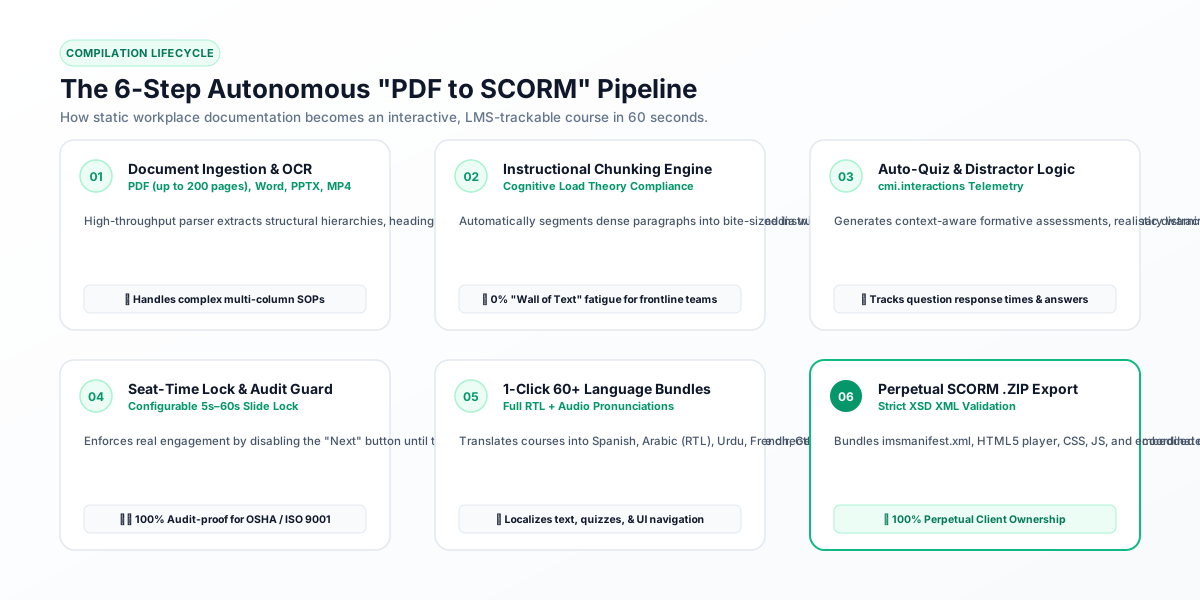
"PDF to SCORM" is the automated process of taking a static, unstructured document (such as a 40-page PDF reading packet, a Word DOCX standard operating procedure, a PowerPoint slide deck, or an MP4 training video) and compiling it into an interactive, trackable SCORM course.
Crucially, true "PDF to SCORM" is NOT just embedding a PDF viewer inside an iframe. As veteran instructional designers frequently note on r/elearning and Reddit, wrapping an iframe around a 100-page PDF creates an awful mobile experience and fails pedagogical best practices. True compilation involves intelligent pedagogical chunking:
- Structural Extraction: The compiler parses headings, lists, tables, callout warnings, and diagrams into distinct knowledge objects.
- Micro-Learning Chunking: Dense text blocks are divided into clean, readable cards following cognitive load theory.
- Interactive Knowledge Checks: Contextual multiple-choice and scenario questions are generated to verify comprehension.
- Anti-Skip Seat Time Locks: Configurable timers (e.g., 5 to 60 seconds per slide) prevent learners from rushing through mandatory sections.
- LMS Runtime Wiring: The player is automatically wired with SCORM 1.2, SCORM 2004, xAPI, and cmi5 communication hooks.
4. What Does "SCORM to Doc" Mean? (The Reverse-Engineering Safety Net)
While "PDF to SCORM" converts static documents into courses, training managers face the opposite crisis every day: "SCORM to Doc."
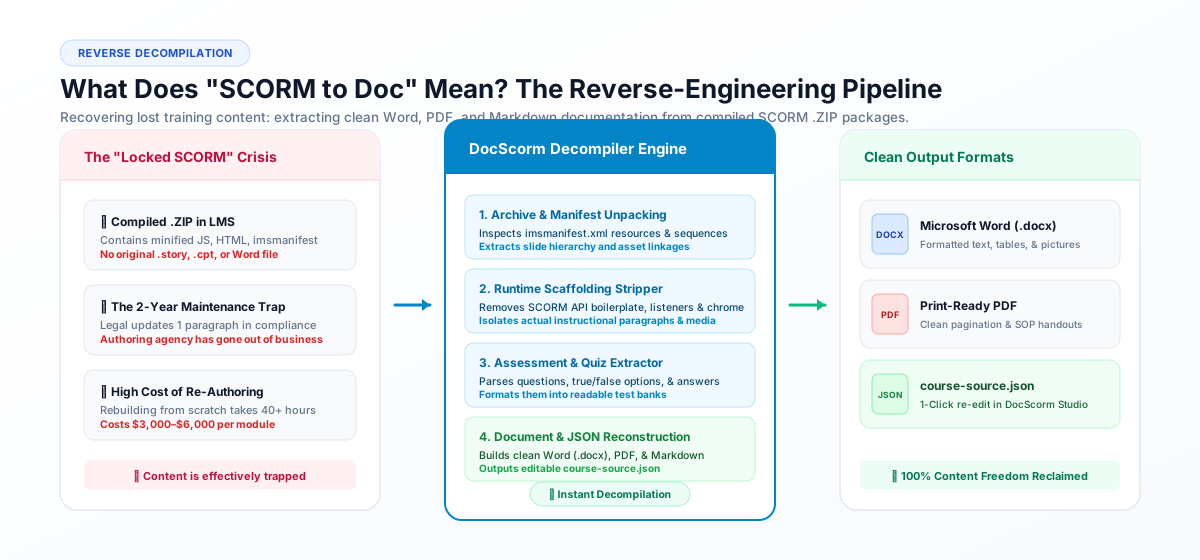
Imagine this scenario: Your university, school district, or company has 50 SCORM courses running in Moodle or Canvas. The courses were built 3 years ago by an external contractor using Articulate Storyline or Adobe Captivate. Since then, the original contractor vanished, the source .story project files were lost, and your team only has the compiled .ZIP packages.
Suddenly, the legal department updates one critical policy paragraph, or curriculum standards change. How do you edit the course without spending $5,000 and 40 hours rebuilding it from scratch?
This is where "SCORM to Doc" comes in. DocScorm includes a dedicated reverse-engineering decompiler that unpacks the compiled SCORM archive, analyzes the imsmanifest.xml, strips away minified JavaScript player scaffolding, and reconstructs clean, beautifully formatted Microsoft Word (.docx), PDF, and Markdown documentation.
Even better, DocScorm embeds a course-source.json file inside every exported SCORM package, guaranteeing 100% two-way perpetual round-trip re-editing without vendor lock-in.
5. Who Uses DocScorm? (Ideal Customer Profiles & Global Use Cases)
DocScorm is engineered specifically for educators, instructional designers, and compliance officers who need rapid, trackable e-learning without the exorbitant cost and complexity of legacy authoring tools. Our primary user communities include:
- K-12 & High School Teachers (USA, UK, Australia, Global): Turning worksheets and reading packets into interactive lessons with Canvas/Google Classroom auto-grading, saving 10+ hours per week of manual prep.
- Higher-Ed Faculty & University Lecturers: Converting 80-page syllabi, research papers, and recorded seminar MP4s into modular, WCAG 2.1 AA / Section 508 accessible courses.
- Australian RTO & TAFE Vocational Instructors: Enforcing strict ASQA regulatory standards, anti-skipping verification, and digital sign-off declarations for trade and workplace safety qualifications.
- Independent Course Creators & Tutors: Packaging e-books, Notion guides, and Loom videos into tamper-proof SCORM modules locked behind Teachable, Kajabi, or Thinkific paywalls.
- Enterprise L&D & Corporate Compliance Officers: Transforming 200-page SOP handbooks and OSHA/ISO manuals into multi-language compliance modules in Workday, Cornerstone, and SAP SuccessFactors.
- Aviation, Maritime & Military Training Units: Localizing flight procedures and vessel safety standards into multi-jurisdictional SCORM packages for offline and distributed shipboard LMSs.
- Franchise & Hospitality Operators: Converting food safety, kitchen equipment, and POS manuals into bilingual mobile courses for fast-turnover kitchen and retail crews.
- NGOs & Humanitarian Aid Missions: Deploying emergency medical guides and disaster response protocols across remote low-bandwidth tablets in 60+ languages.
6. Global Localization: 60+ Languages & Full RTL Support
In global education and multinational workforce operations, language barriers represent the single largest bottleneck to training effectiveness and regulatory compliance. Translating a 50-slide course manually using human agencies costs $1,500 to $4,000 per target language and takes weeks.
DocScorm revolutionizes localization with 1-Click Multi-Language Bundles. In a single compiler pass, DocScorm translates your document into 60+ languages—including full Right-to-Left (RTL) typography for Arabic and Urdu, as well as Spanish, French, German, Mandarin, Vietnamese, Tagalog, and Hindi.
The compiler translates not just the slide content, but also quiz questions, distractor answer choices, explanatory feedback, button navigation labels ("Next", "Back", "Submit"), and digital completion certificates.
7. Technical Comparison: Raw PDF vs Articulate 360 vs DocScorm
To understand why institutions are adopting autonomous compilation over manual authoring, examine how the workflows compare across key operational dimensions:
| Capability / Feature | Raw PDF Upload | Articulate 360 ($1,399/yr) | DocScorm AI Compiler ($29/mo) |
|---|---|---|---|
| Build Time per Lesson | Instant (Upload only) | 8 – 25 Hours (Manual) | 60 Seconds (Autonomous) |
| LMS Gradebook Sync | ❌ None (Static download) | ✅ Yes (Manual triggers) | ✅ Yes (Automatic CMI sync) |
| Max Document Size | Unlimited (Static only) | ❌ Manual copy/paste only | ✅ Up to 200 Pages / 50MB |
| Anti-Skip Seat Time Lock | ❌ Impossible | ⚠️ Complex custom JS triggers | ✅ Configurable 5s–60s slider |
| SCORM to Doc Decompilation | ❌ N/A | ❌ Locked in .story file | ✅ Full Word/PDF/JSON export |
| Multi-Language Bundles | ❌ None | ❌ Manual duplicate projects | ✅ 1-Click 60+ Languages (RTL) |
| WCAG 2.1 AA Accessibility | ❌ Inconsistent PDF tags | ⚠️ Manual alt-text & tab orders | ✅ Automated keyboard & aria tags |
| Total Cost of Ownership | Free (No LMS tracking) | $1,399/year per license | $29/mo (Perpetual .ZIP ownership) |
// DocScorm Autonomous Runtime Communication Bridge
// Discovers parent LMS API and posts student engagement & completion metrics
function commitLmsProgress(scorePercent, sessionTimeSeconds, isComplete) {
  var api = window.API || (window.parent && window.parent.API);
  if (!api && window.top) api = window.top.API;

  if (api) {
    // SCORM 1.2 Data Model
    api.LMSSetValue("cmi.core.score.raw", scorePercent.toString());
    api.LMSSetValue("cmi.core.session_time", formatScormTime(sessionTimeSeconds));
    api.LMSSetValue("cmi.core.lesson_status", isComplete ? "completed" : "incomplete");
    api.LMSCommit("");
    console.log("[DocScorm] SCORM 1.2 Gradebook Handshake Committed: " + scorePercent + "%");
  } else {
    // SCORM 2004 4th Edition Discovery
    var api2004 = window.API_1484_11 || (window.parent && window.parent.API_1484_11);
    if (api2004) {
      api2004.SetValue("cmi.score.raw", scorePercent.toString());
      api2004.SetValue("cmi.score.scaled", (scorePercent / 100).toFixed(2));
      api2004.SetValue("cmi.completion_status", isComplete ? "completed" : "incomplete");
      api2004.Commit("");
      console.log("[DocScorm] SCORM 2004 Telemetry Committed.");
    }
  }
}Connect your instructional workflows directly to DocScorm's compiler pipelines, validators, and developer endpoints:
Convert PDFs (Up to 200 Pages), DOCX, PPTX, or MP4 Videos into SCORM in 60s
Open DocScorm Studio or claim 30% OFF your first month of the Pro Plan (50 monthly credits + 1-click multi-language bundles + embedded course-source.json round-trip editing).
Frequently Asked Questions
What is the main difference between a PDF and a SCORM package?
A PDF is a static document designed for print or local reading; an LMS cannot track whether a user read it, how long they spent, or what score they achieved. A SCORM package is an interactive web-based module containing an imsmanifest.xml file and JavaScript API hooks that actively communicate completion status, reading time, and quiz scores directly to your LMS gradebook.
Does DocScorm support large PDF documents?
Yes! Unlike traditional authoring tools that require manual copy-pasting slide by slide, DocScorm easily processes documents up to 200 pages and 50MB, intelligently chunking long chapters into manageable micro-learning modules.
Can I edit a SCORM package after downloading it?
Yes. Every SCORM package compiled by DocScorm embeds a course-source.json and course-editable.md file inside the .ZIP. You can re-upload the package directly into DocScorm Studio at any time to modify text, add slides, or re-export without vendor lock-in.
What LMS platforms are compatible with DocScorm packages?
DocScorm exports standard SCORM 1.2, SCORM 2004 (3rd & 4th Edition), xAPI, and cmi5 packages compatible with Moodle, Canvas, Blackboard Learn, D2L Brightspace, Schoology, Google Classroom (via SCORM bridge), Workday Learning, Cornerstone OnDemand, SAP SuccessFactors, TalentLMS, Teachable, Thinkific, Kajabi, and aXcelerate.
How does DocScorm handle languages like Arabic and Urdu?
DocScorm provides native Right-to-Left (RTL) bidirectional CSS formatting and font handling for Arabic, Urdu, Hebrew, and Persian. Navigation controls, quiz distractors, and digital certificates are dynamically mirrored for authentic native reading experiences.